Reports
The report page allows a user to search different skeletal elements by another categories. The categories currently available for search are:
- mtDNA
- Zones
- Methods
- Measurements
- Articulations
- Individual Numbers
- Trauma
- Anomaly
- Pathology
For all reports, you have several export options.
- Copy results in a tabular format to the clipboard
- Download an Excel file
- Download a PDf file
Additionally, on each report results table, you can select how many results should be displayed, and visible columns.
Sample Report Output
Here you can view the export and table view options for a set of results

Each report will be outlined in detail.
Advanced Report

The Advanced Report is the most comprehensive search available for a given skeletal element. It allows the user to search by the following fields.
- Bone Name
- Bone Side
- Bone Completeness
- Who created the record
- Who reviewed the record
- Status of the bone, including:
- Measured Status
- DNA Sampled Status
- CT Scanned Status
- Xray Scanned Status
- Clavicle Triage Status
- Inventory Completed Status
- Reviewed Status
This report has no required fields.
mtDNA Report

The mtDNA report is designed to allow a user to locate bones by a specific mtDNA or mtDNA subgroup. The search fields available are:
- Mito Sequence Number
- Mito Sequence Subgroup
Multiple Mito Sequence Numbers and Subgroups can be searched at one time.
The user is required to select at least one Mito sequence number or subgroup.
Zones Report

The Zones Report is designed to allow a user to locate bones by a specific zone. The search fields available are:
- Accession Number
- Provenance Number 1
- Provenance Number 2
- Bone
- Side
- Zones
You can also select from one of 5 search types:
- Inclusive
- Exclusive
- Inclusive Only
- Exclusive Only
- Exclusive Or
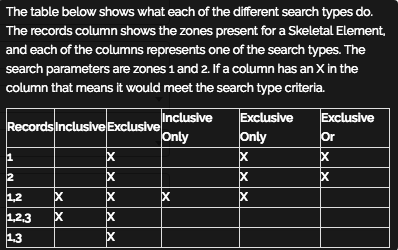
The user is required to select a Bone and a Zone for this report.
Methods Report

The Method Report allows a user to search by bones by a specific method. The search fields available are:
- Accession Number
- Provenance Number 1
- Provenance Number 2
- Bone
- Method Type
- Method
- Method Feature
- Score
- Range
The user is required to select a bone and a method for this report.
Measurements Report

The Measurements Report allows a user to select by individual number and side of a bone. The search fields available are:
- Accession Number
- Provenance Number 1
- Provenance Number 2
- Bone
- Side
- Individual Number
- Side
No fields are required for this report.
Articulations Report
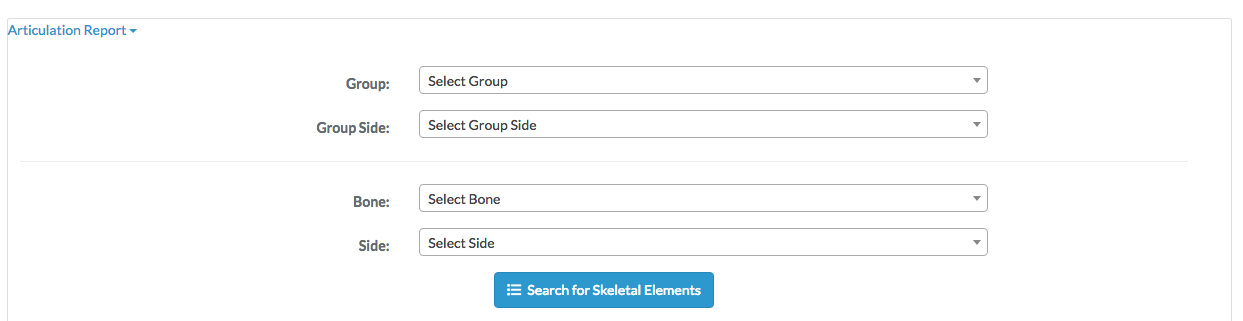
The Articulations Report allows a user to select by Group and Group Side. The search fields available are:
- Group
- Group Side
- Bone
- Side
A Group or Bone is required for this report.
Individual Number Report

The Individual Number Report allows a user to select by an individual bone number. The search fields available are:
- Accession Number
- Provenance Number 1
- Provenance Number 2
- Individual Number
- Bone
- Side
An Individual Number is required to run this report.
Trauma Report
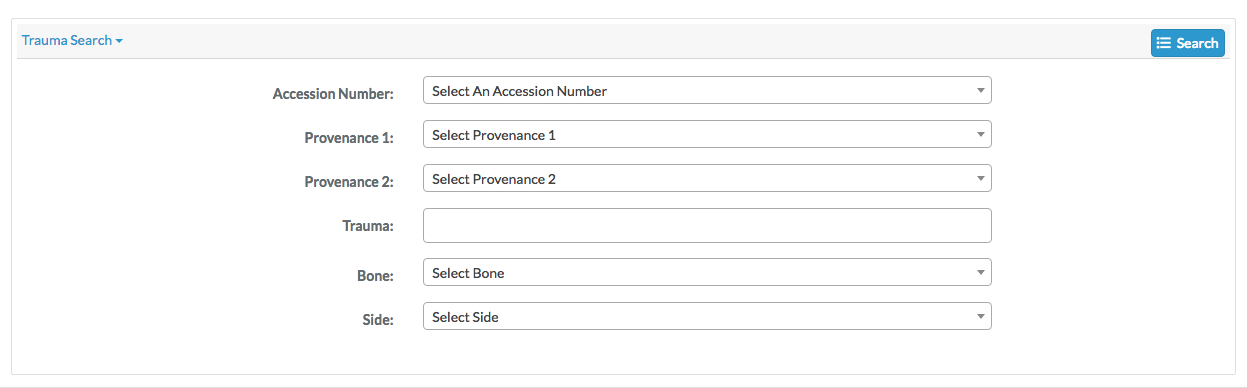
The Trauma Report allows a user to select by an trauma category. The search fields available are:
- Accession Number
- Provenance Number 1
- Provenance Number 2
- Trauma
- Bone
- Side
You must select a trauma category to run this report.
Anomaly Report

The Anomaly Report allows a user to select by an anomaly category. The search fields available are:
- Anomaly
- Bone
- Side
An anomaly category must be selected to run this report.
Pathology Report

The Pathology Report allows a user to select by an pathology category. The search fields available are:
- Accession Number
- Provenance Number 1
- Provenance Number 2
- Pathology
- Bone
- Side
A pathology category must be selected to run this report.